
Smart Home Mistakes Beginners Make and Why They Cause Problems Later
So you grabbed your first smart devices because it looked simple—then the apps won’t connect, devices don’t play nice, and your “easy” setup turns into a daily headache. That’s normal. Most of the pain comes from a handful of smart home mistakes beginners make early, before they realize how fast small choices compound.
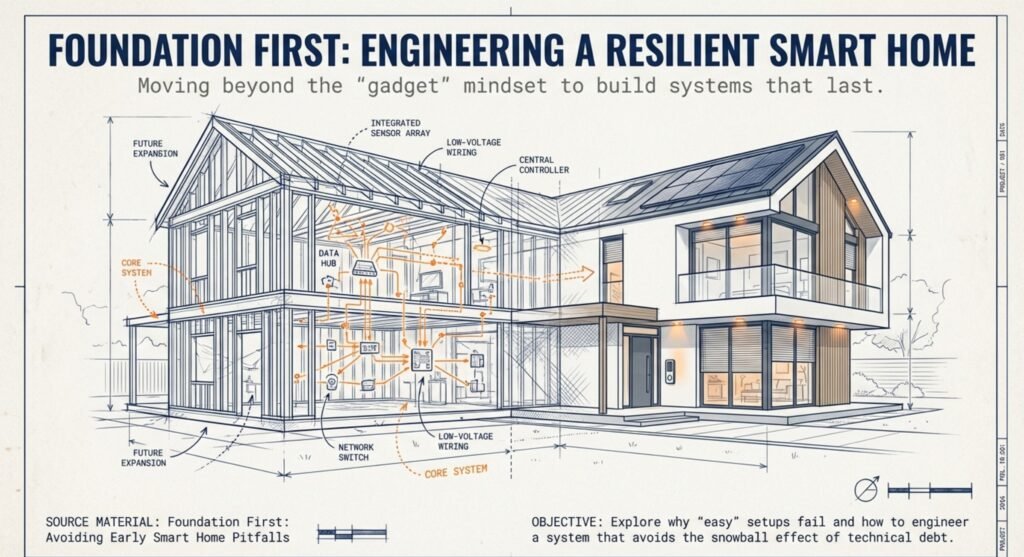
In the first month, common smart home setup mistakes usually look harmless: mixing ecosystems, ignoring network prep, skipping basic security steps, or building automations before your foundation is stable. But a few months later, those same beginner smart home setup problems can snowball into devices that drop offline, routines that misfire, and systems that become impossible to manage.
This guide breaks down the most common failure points—smart home compatibility issues beginners hit, smart home WiFi problems beginners don’t notice until later, and smart home security mistakes beginners tend to postpone. You’ll also see the smart home automation mistakes beginners make when they try to “go advanced” too early—so you can build a setup that stays reliable as you add more devices.
Key Takeaways
These are the smart home mistakes beginners make most often—fix these first and the rest gets easier.
- Buying devices from different ecosystems without checking compatibility leaves you with a jumble of stuff that won’t work together
- Weak home networks and sloppy security habits mean unreliable connections and devices that are easy targets for hackers
- If you skip organizing or ignore whether devices will be supported long-term, your setup gets confusing fast and turns into a nightmare as you add more tech
Ecosystem Compatibility Mistakes Beginners Make First
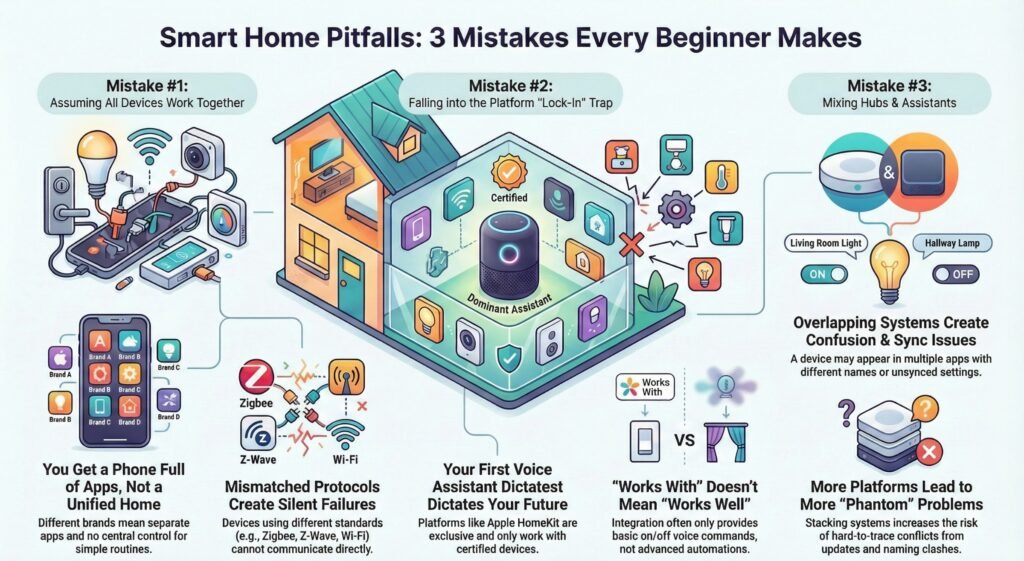
Lots of beginners buy whatever looks cool, and that’s where smart home compatibility issues beginners hit first.
Assuming all devices work together (why compatibility fails)
You pick up a smart lock, some smart lights, maybe a thermostat—all different brands. You figure, hey, they’re all “smart,” so they’ll work together. Spoiler: they probably won’t. Each one comes with its own app, its own wireless setup, its own cloud. Nothing’s unified.
What you really get is a phone full of random apps. You can’t set up something simple like “turn off everything when I leave” because there’s no central hub. A video doorbell and smart lights can look compatible on the box, but smart home compatibility issues beginners run into usually show up after everything is installed.
Protocols matter more than most people expect. Mixing standards is one of the common smart home setup mistakes that creates silent compatibility failures later. If one device uses Zigbee and another uses Z-Wave, forget about them working together. WiFi devices can run on their own, but they’ll just clog up your network. Matter was supposed to fix all this, but honestly, most stuff you already own doesn’t support it, and Matter-certified devices still have their own quirks.
And usually, you only realize this once everything’s installed and you’ve already tossed the boxes.
Platform lock in creates beginner smart home setup problems
Maybe you started with Amazon Alexa because you got an Echo as a gift. Then you keep adding “smart home compatible” devices without checking if they actually work with Alexa.
Apple HomeKit is picky—it only works with Apple-certified stuff. If you’ve got an iPhone but buy gadgets that only support Google Assistant, you’re out of luck with Siri. And if your family uses Android, forget about them using HomeKit at all. Every platform is its own island. That’s why beginner smart home setup problems often start with the first voice assistant choice.
Lock-in messes with more than just basic controls. Alexa routines aren’t the same as Google Home routines. Some features, like geofencing or custom schedules, only show up in the brand’s own app—not your main smart home platform. “Works with Alexa” usually just means you can turn it on or off by voice. That’s it. No magic automations.
Mixing hubs and assistants leads to smart home automation mistakes
You bought a SmartThings hub because it supports a lot, but you prefer Google Assistant for voice. Now you’ve got two overlapping systems that don’t really sync.
The hub handles Zigbee and Z-Wave, but your Google Home app doesn’t show all the automation options from SmartThings. You have to pick which system does what, and it’s never clear where to set things up. Sometimes the same device shows up in both apps, but with different names, and changing a setting in one doesn’t update the other.
A common setup is one bridge for lights, one hub for sensors, and a separate voice assistant. The more platforms you stack, the more likely updates or naming conflicts create ‘phantom’ problems that are hard to trace.
Network and WiFi Mistakes That Cause Random Dropouts
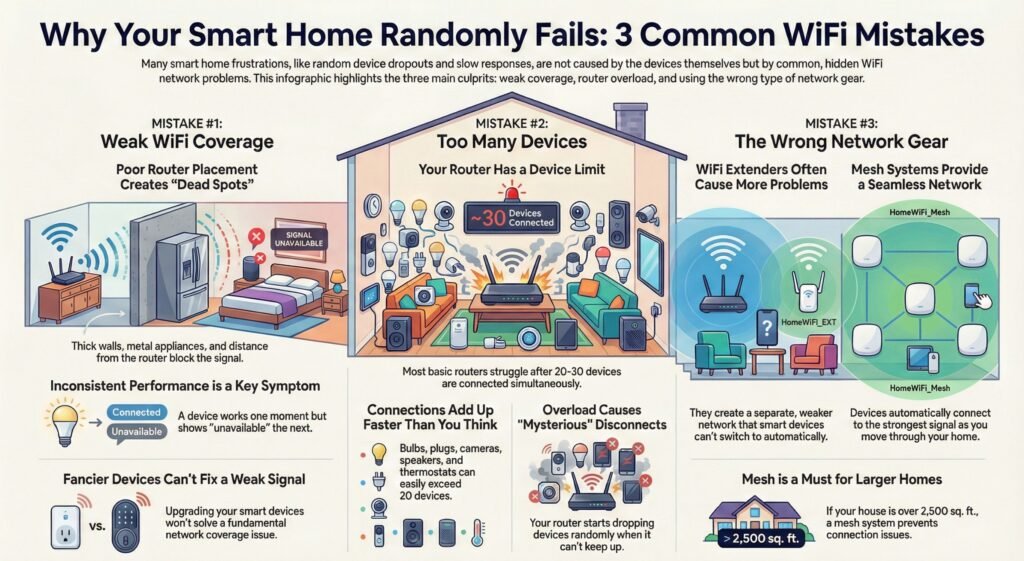
Most people assume an old router is fine—until smart home wifi problems beginners start showing up as random delays and disconnects.
Weak WiFi coverage is the most common hidden failure
You probably set up your first smart device right next to the router. Of course it worked. But most homes have dead spots where Wi-Fi just can’t reach—thanks, thick walls and metal appliances.
Smart plugs in the basement or outdoor cameras may go dark if they’re too far from the router. You expect instant control from your phone, but sometimes it takes 10–20 seconds, or the device just shows “unavailable.”
The worst smart home wifi problems beginners face are the inconsistent ones: devices work sometimes, then fail right when you need them. Your smart lock works in the morning, but not at night when you’re standing outside. Security cameras buffer right when you need to check a recording.
Router placement really matters. If it’s in a basement or tucked in a corner, anything on another floor will struggle. Buying fancier smart devices won’t fix a weak signal.
Too many devices on one router triggers weird outages
You keep adding gadgets, but never check how many your router can handle at once. Most cheap routers max out at around 20–30 devices before things get weird, but you won’t notice until you hit that wall.
Every smart bulb, plug, sensor, and camera keeps a steady connection. Once you stack enough devices, your router can start dropping connections randomly—one of the most frustrating beginner smart home setup problems because it feels ‘mysterious’. Maybe your smart speaker stops listening if someone’s streaming video, because the router just can’t keep up.
Here’s a typical device list beginners don’t realize adds up fast:
- 8 smart bulbs in a few rooms
- 6 smart plugs for lamps and appliances
- 4 security cameras
- 3 smart speakers
- 2 smart thermostats
- And then all your phones, tablets, laptops
That’s already 20+ devices, not even counting smart TVs or consoles. Your doorbell camera freezes when guests show up because everything’s fighting for bandwidth. Video calls lag when your thermostat updates itself. Annoying.
Extenders vs mesh why your devices keep disconnecting
You grabbed a Wi-Fi extender thinking it’ll fix dead spots, just like a mesh network would. Many extenders create a separate network name or weaker handoff, which can trigger smart home wifi problems beginners mistake for ‘bad devices’.
Your smart gadgets won’t roam between router and extender by themselves. If your smart vacuum starts in the living room, it might lose connection in the bedroom where only the extender reaches. You’ll end up reconnecting devices by hand or just living with broken automations.
Mesh systems cost more, but they give you one big seamless network. Devices switch between nodes on their own. If your house is bigger than 2,500 square feet and you don’t have mesh, you’ll be troubleshooting connections way more than you’d like.
Long Term Support Mistakes That Break Setups Over Time
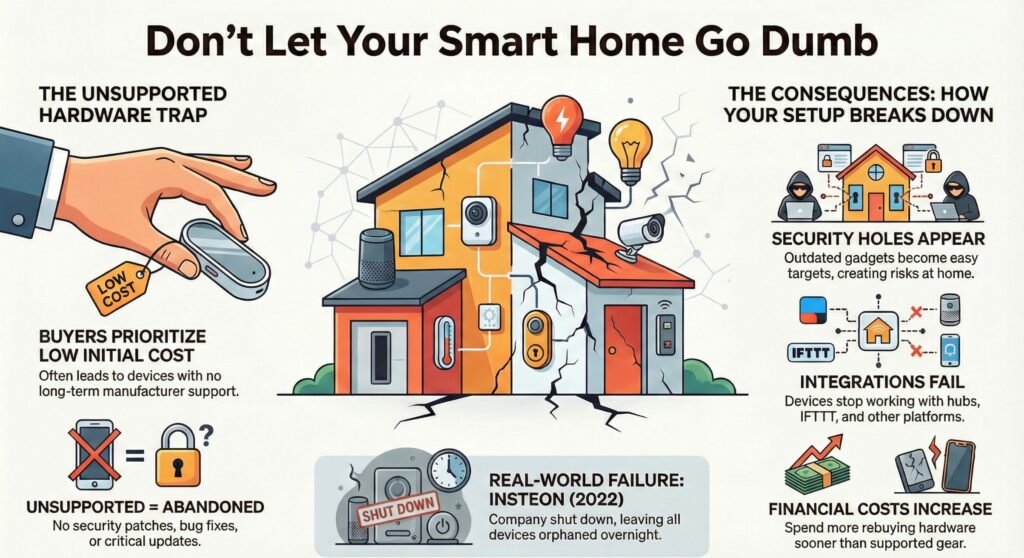
Lots of folks just pick devices based on what looks good now and what’s cheapest, without checking if the company will support them next year. That’s how you get security holes, broken integrations, and gadgets that just stop working with the rest of your setup.
No firmware updates equals stability and security issues
You buy a smart lock or camera but never check if the company actually updates its software. After a few platform updates, the gaps start showing—your device stays behind and begins dropping offline.
This happens because you just assumed things would keep working. Nope. Regular updates fix bugs and patch security—skipping them is one of the smart home security mistakes beginners make because everything still ‘seems fine’ at first. Without them, your gadgets become easy targets or just stop working with new stuff.
Remember Insteon? When they shut down in 2022, their devices were orphaned overnight. No more updates, no more fixes. You’re stuck with hardware that technically works, but can’t keep up with changes.
Before you buy, check if the company actually updates their stuff. Look for brands that still update older devices, not just the new releases. If they only update in the first year, maybe skip them.
Unsupported devices create compatibility and security gaps
You spot a bargain on a smart plug or sensor that’s been out for years. What you don’t see is the company already moved on and stopped supporting it. Try connecting it to IFTTT or your hub—suddenly, nothing works right.
Cheap, unsupported devices get outdated fast when companies drop security patches and integration support. You’ll end up replacing them sooner than you planned.
Honestly, you’ll spend more in the long run than if you’d just bought supported gear from the start. You’ll rebuy the same thing in two years instead of five or more.
Setup and Automation Mistakes Beginners Make Too Early
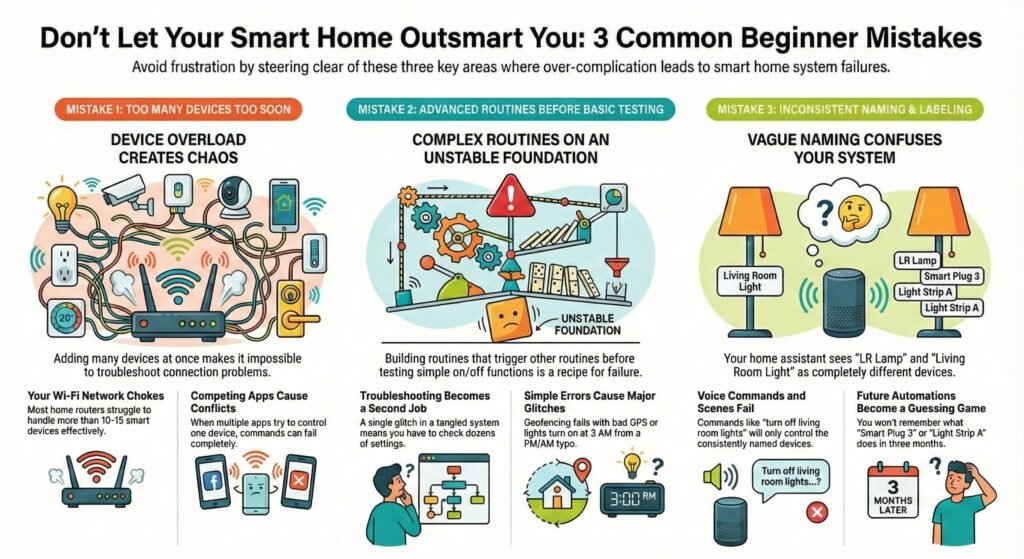
It’s tempting to go big fast, but many smart home automation mistakes beginners make come from building routines before the basics are stable.
Too many devices at once makes troubleshooting impossible
You grab smart lights for every room, throw in a bunch of cameras, put in smart locks, and set up speakers—all in one go. Within days, you’re already wrestling with connection problems you can’t figure out, because honestly, you have no clue which device is causing the mess.
This usually happens when you think more devices means better automation. But here’s the thing: every new device is just another thing that can break. If your lights suddenly stop answering voice commands, is it the bulbs? The router? Your home assistant? Or maybe it’s just interference from the dozen gadgets you set up yesterday. Who knows?
Your network starts to choke. Most cheap routers can only handle 10-15 smart devices before things get laggy. Some gadgets respond right away, others just give up and time out.
The frustration really kicks in when you can’t turn off your bedroom light because three different apps are all trying to control it. This is how common smart home setup mistakes start: too many devices, too many apps, and no clear baseline.
Advanced routines too soon cause automation chaos
You dive straight into creating routines that trigger other routines, and you haven’t even tested if the basic on-off works. You set up geofencing to unlock doors when you get home, link Alexa skills to adjust the temperature based on the weather, and even throw in ChatGPT for voice commands.
Your first automation breaks and you’re left guessing. Was it the location trigger? The time condition? Some device just refusing to cooperate? Now you’ve built a system so tangled that troubleshooting means checking 47 different things.
Geofencing fails when your phone’s GPS gets weird. Lights pop on at 3 AM because you set PM instead of AM. Voice commands stop working because two skills are fighting each other.
At this point, you’re spending more time fixing automations than you would just flipping regular switches. Suddenly, your smart home feels like a second job instead of a convenience.
Naming and labeling errors sabotage voice and routines
You name devices whatever pops into your head: “Living Room Light 1,” “LR Lamp,” “Lamp – Living Room,” “Front Light.” Your automation system has no idea these are all in the same room.
Voice commands and routines fail because inconsistent names confuse your system—one of the easiest smart home automation mistakes beginners can avoid. You say, “turn off living room lights,” and only one turns off. The rest? Wrong names. You try to make a “Movie Time” scene but can’t remember what you called half your stuff.
Fast forward three months: you’ve got 40 devices with names like “Smart Plug 3” and “Light Strip A.” Good luck remembering what’s what. New automations turn into a guessing game, since your device list looks like a jumble of random words.
Your Home Assistant says “bedroom_light_2” but you can’t tell which bedroom or which light it is. You waste 20 minutes clicking through everything just to find the right one.
Smart Home Security Mistakes Beginners Make Without Noticing
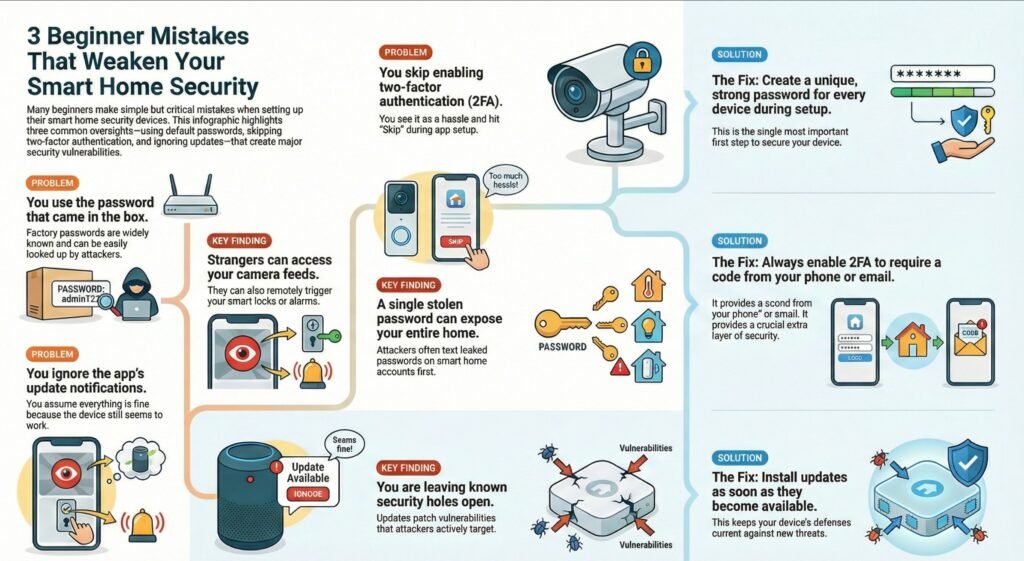
Lots of beginners leave cameras, locks, and doorbells exposed because smart home security mistakes beginners make often feel ‘optional’ during setup.
Default passwords are the easiest way to lose control
You set up your Ring video doorbell or smart lock using the password that came in the box. Months later, you’re wondering why your neighbors get motion alerts from your cameras or why someone accessed your two-way audio.
Default passwords are widely known and reused, which is why they’re one of the biggest smart home security mistakes beginners make. Anyone nearby can look up your device and try the factory settings. This is especially bad for smart security systems since smart devices are always talking to each other, making them easy targets.
What actually happens:
- Doorbell or camera feeds get accessed by strangers
- Locks or alarms get triggered remotely
- You lose trust in alerts because activity looks “random”
You think changing passwords is just an extra step you can skip. The device works, so you move on to the next thing.
Skipping two factor is a common security shortcut
Your security app offers two-factor authentication during setup. You hit “Skip” because typing in codes feels like a hassle. Three months later, someone’s watching your security cameras from who-knows-where.
Most camera and smart lock apps have two-factor authentication as an extra layer—it just needs a code from your phone or email. Without it, if someone steals your password, they’re in. And honestly, stolen passwords from other sites get tried on smart home accounts first, since these control your actual house.
Real consequences:
- Anyone with your password can log in from anywhere
- One leaked password can expose multiple smart home accounts
- You may not notice until settings, users, or alerts change
Update procrastination creates real security holes
Your security system nags you about updates every few weeks. You ignore it because the cameras still work and the locks still open. Eventually you notice alerts lag, recordings fail, or quality drops—and the root cause is usually skipped updates.
Updates aren’t cosmetic. Skipping them keeps known holes open, and smart security devices are often the first target.
Power Outage Mistakes That Make Smart Homes Feel Unreliable
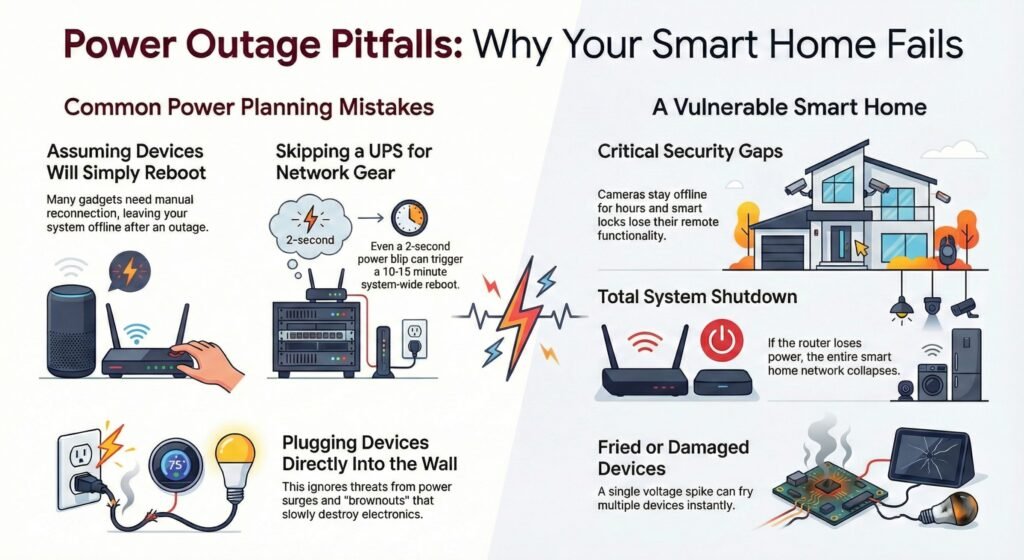
Most beginners just assume their smart home will keep running during short power outages. But really, most devices reboot or drop offline the second the power blips. People also skip surge protectors, thinking these gadgets are too small to matter.
Leaving Smart Devices Vulnerable to Outages
You expect your router, hub, and cameras to restart themselves after a power flicker—but that’s not always how it goes. A lot of devices need you to manually reconnect them. Suddenly, your doorbell camera’s dead, your smart lock lost its schedule, and your thermostat’s back to default.
This happens because the network stack is fragile during reboots—one of those beginner smart home setup problems you only notice after the first outage.
The real headache comes during storms or grid work. You’re not home, and your cameras stay offline for hours. Your smart locks won’t answer remote commands. Food spoils in your smart fridge because you can’t check the temperature.
Not Planning for UPS or Power Surge Protection
You plug pricey smart gear straight into the wall, thinking the built-in power supply is enough. It’s not. One voltage spike from a storm or grid switch can fry a bunch of devices at once.
Beginners skip a UPS for their router because it seems like overkill for “just a router.” Then, a 30-minute outage knocks out the whole smart home. Without a UPS, even a two-second power blip can trigger a full system reboot that takes 10-15 minutes to sort itself out.
And power quality? Most folks don’t think about it. Brownouts and voltage dips slowly wreck electronics. After six months, your smart hub starts acting weird, and you blame the app—when really, unstable power is frying the insides.
Organization Mistakes That Make Daily Control Annoying
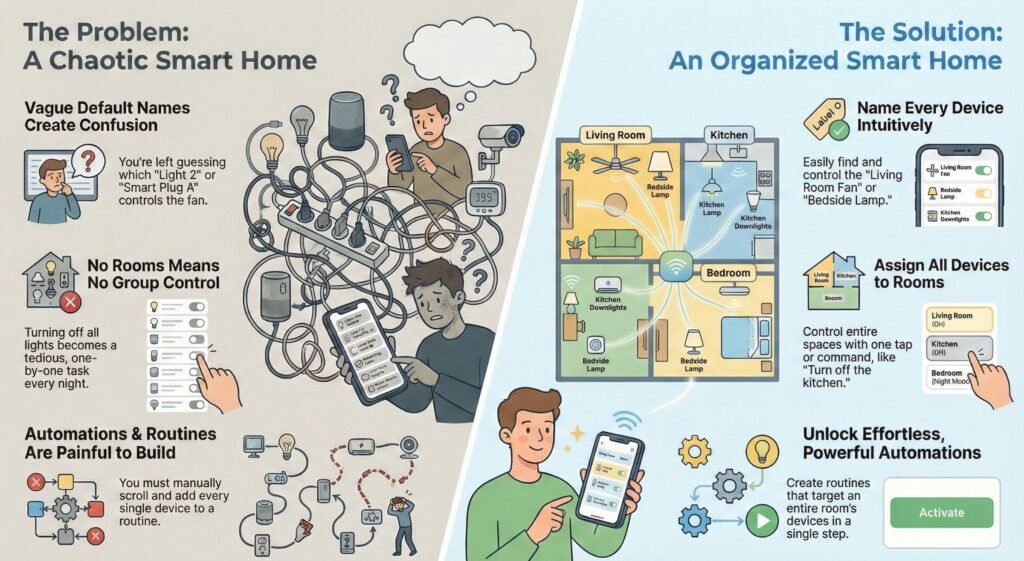
Most beginners add devices one at a time, without naming them or assigning them to rooms. You figure you’ll remember which is which, but after ten smart bulbs or five smart plugs, the default names are a mess. Without rooms and groups, automations become painful—another set of smart home automation mistakes beginners make without realizing it.
Leaving Devices Unnamed or Unsorted
You add a smart bulb and it’s “Light 1.” Add another, now it’s “Light 2.” You tell yourself you’ll remember.
Once you add a few more devices, the default names turn into a mess fast—then automations become painful.
Same thing with smart plugs. You install four, they’re called “Smart Plug A” or “Outlet 3.” When you want to turn off the living room fan, you’re just guessing. Can’t search for “living room fan” if you never named it that way.
No rooms and groups equals endless tapping and broken routines
So, you’ve got a bunch of smart devices—maybe fifteen or so—all set up, but you never bother to assign them to rooms or areas in your smart home hub. Each gadget does its thing, sure, but if you want to control more than one at a time? You’re stuck picking them out one by one. Not exactly what you pictured, right?
Let’s say you’re heading to bed and want to turn off all the lights. Instead of one tap, you end up poking at your phone for each lamp. Maybe you assume there’s a “master off” switch somewhere, but nope—there isn’t, because you have to assign devices to areas first. You might eventually make a routine, but that means scrolling through your whole list and adding each device by hand. It gets old fast.
Lots of beginners skip grouping devices together since it feels like a hassle. You figure, “Eh, I’ll just control them one at a time.” But after a week of tapping twelve times every night, you’ll probably wish you’d grouped them. With no room assignments, you can’t just say “turn off the kitchen,” and you can’t set up a single automation for all the bulbs in one space.
This messes with remote room sensors and smart wall switches too. You might install them, but if you don’t link them to a specific area, your automations can’t trigger based on location. It’s like having a smart home that’s not quite as smart as it could be.
Quick checklist to avoid smart home mistakes beginners make
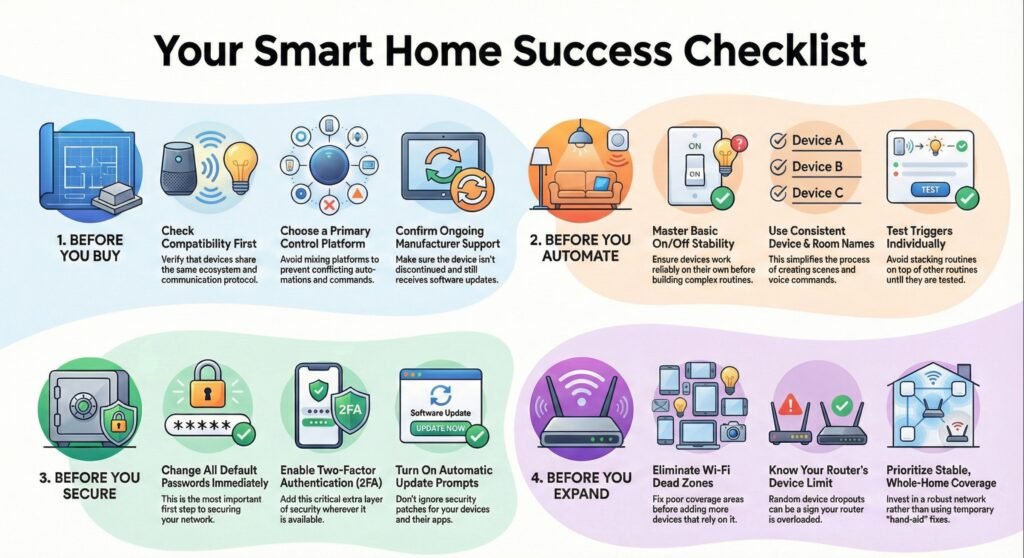
Before you buy
- Check ecosystem + protocol compatibility first (don’t assume “smart” means compatible)
- Avoid mixing platforms unless you know what will control automations
- Confirm the device still gets updates and isn’t discontinued
Before you automate
- Get basic on/off stability first (then routines)
- Don’t stack routines on routines until you’ve tested triggers
- Use consistent device names and room labels before building scenes
Before you secure
- Change default passwords immediately
- Enable two-factor authentication where available
- Turn on update prompts (device + app) so security patches don’t get ignored
Before you expand
- Fix dead zones before adding more devices
- Watch your router device limit (random dropouts are a warning sign)
- Prefer stable whole-home coverage over “band-aid” fixes
Smart Home Mistakes Beginners Make (Quick Answers)
What are the most common smart home setup mistakes beginners make?
Mixing incompatible devices, ignoring network limits, skipping basic security, and trying advanced automations before the basics are stable.
Why do smart home compatibility issues beginners face show up after installation?
Because everything works during setup. The problems appear later when devices update, routines stack, or you add one more gadget that pushes the system over the edge.
What causes smart home Wi-Fi problems beginners keep calling “random disconnects”?
Weak coverage, overloaded routers, and devices fighting for connections. It feels random, but it’s usually a capacity or signal issue.
What are the biggest smart home security mistakes beginners make during setup?
Leaving default passwords, skipping two-factor authentication, and delaying updates because “everything still works.”
Which smart home automation mistakes beginners make cause routines to misfire?
Building complex routines too early, using unclear device names, and stacking triggers without testing them individually.
How do I fix beginner smart home setup problems without restarting everything?
Slow down. Fix connectivity first, clean up device names and rooms, simplify automations, then rebuild one layer at a time.