Smart Home Automation Without Subscription: How Local Control Really Works
Smart homes feel simple—until you hit paywalls. You buy lights, sensors, locks, and cameras expecting them to work together, then a “plan” shows up for remote access, alerts, or storage. Smart home automation without subscription is the workaround: you run key automations locally, so your routines keep working even if you never pay a monthly fee.
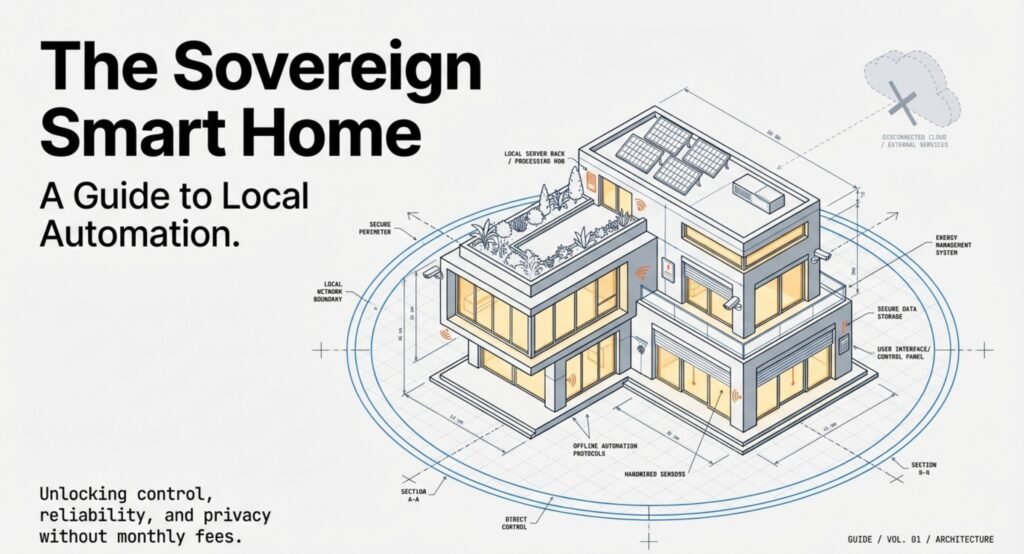
In this guide, you’ll learn how to automate smart home without subscriptions using local rules, device scheduling, and a local smart home hub for automation when you want one control layer. You’ll also see what still depends on the internet (usually voice and remote access), what continues during outages, and how to set realistic expectations when you choose stability over cloud convenience.
We’ll finish with the security basics—because subscription free smart home privacy and security improves when less data leaves your home, but you still need to protect smart home network without cloud habits like weak router settings.
Key Takeaways
- Subscription-free automation relies on local control and basic features
- Privacy and security usually get better when there’s less cloud involved
- No monthly fees often means fewer advanced or remote perks
Understanding Smart Home Automation Without Subscription (Local Control Basics)
Smart home automation without a subscription is all about local control, a one-time setup, and using your devices without getting stuck with monthly fees. If you’re wondering how to automate smart home without subscriptions, start by picking devices that support local rules and keep core functions on your network.
What Subscription-Free Smart Home Automation Means at Home
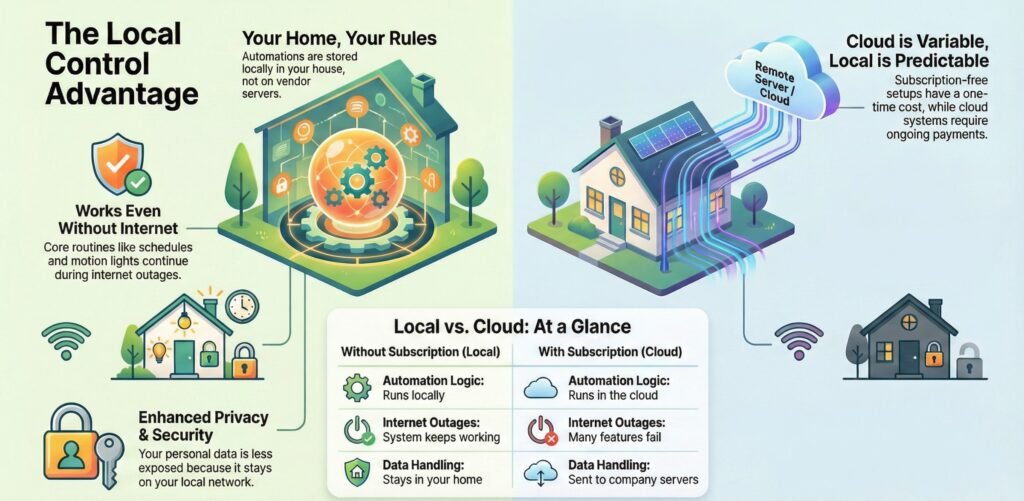
Subscription-free smart home automation means your devices run automations without those ongoing payments. Your lights, sensors, and switches follow rules stored right at home—not on vendor servers.
Usually, you’ll control these systems through a local hub or controller. Platforms like local-first home automation software let you mix devices from different brands without needing a paid plan, like in this guide on building a smart home without spending lots of money.
This setup matters for security. Local processing means less of your data leaves the house. When your internet drops, smart home automation works without internet for local routines—like motion lights, schedules, and sensor-based triggers—because the rules stay inside your home.
Some advanced setups add local energy monitoring or detailed usage reports, but that’s optional for most homes. For beginners, the win is simple: keep your rules local so your lights, sensors, and schedules keep working without a paid plan.
Local Control Smart Home Automation Setup: A Simple Starting Path
If you want a setup that doesn’t depend on monthly fees, start small and build in a way that keeps your rules inside your home.
- Pick one room and one goal
Start with something obvious: motion lights in a hallway, a bedtime scene, or a morning routine. - Choose devices that support local control
Look for devices that can run basic schedules or respond to sensors without needing constant cloud access. - Decide if you need a hub
If you’re only controlling a few devices, you might not. If you want everything in one place, use a local smart home hub for automation to store your rules and simplify multi-device routines. - Store automation rules locally
Keep schedules, triggers, and scenes on-device or on your local control layer so your routines keep working during outages. - Lock down the basics
Use a strong router password, keep firmware updated, and disable remote features you don’t use—simple steps that help protect smart home network without cloud dependence becoming a risk.
That’s the cleanest beginner path for how to automate smart home without subscriptions without turning it into a complicated project.
Local vs Cloud Automation: What You Gain (and Lose)
Subscription-based systems really lean on the cloud. If you stop paying, you might lose features or see things stop working right.
Here’s a quick look at the main differences:
| Area | Without Subscription | With Subscription |
|---|---|---|
| Automation logic | Runs locally | Runs in the cloud |
| Internet outages | System keeps working | Many features fail |
| Data handling | Stays in your home | Sent to company servers |
| Long-term cost | Predictable | Ongoing and variable |
Subscription setups usually bundle in things like alerts, remote access, or video storage. Local systems, on the other hand, give you more say over what runs, when, and where your data lives—a point that comes up in guides on smart home automation basics.
Subscription-free automation is usually more stable and private because more of your rules and data stay at home. The downside is convenience: remote control, cloud notifications, and “smart” camera features can be limited unless you configure them yourself. If you value routines that keep working during outages and fewer accounts to manage, local control is often the better long-term fit.
What You Can Do Without Monthly Fees (Control, Schedules, Scenes)
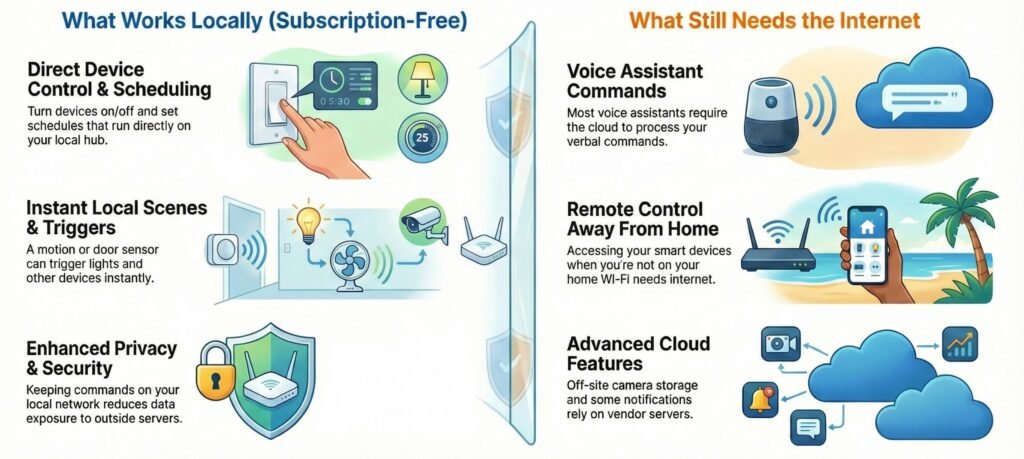
With smart home automation without subscription, plenty of systems still handle core control, schedules, and local scenes without monthly fees. You can control devices, run basic automations, and keep your data at home. These features use your home network, device firmware, and local processing—so your routines aren’t tied to a paid cloud tier.
Device Control and Scheduling on Your Network
You can turn lights, plugs, locks, and thermostats on or off—no subscription needed. Most brands let you do this through a local app or web interface, as long as your phone’s on the same Wi-Fi.
Scheduling works too. You can set lights to come on at sunset or have the thermostat change at certain times. These schedules usually run right on the device or hub, not in the cloud.
This setup boosts security since fewer commands leave your house. You also dodge cloud outages. Many guides, like this one on smart home automation without subscription using Home Assistant, recommend this local-first approach.
Voice Control Without a Plan (What Still Uses Internet)
Voice control usually works at a basic level without a paid plan. You can ask a voice assistant to turn things on or off, or run simple routines. These commands often go through the cloud, but you don’t need a separate device subscription.
What you miss out on are things like detailed voice history or custom alerts. Basic voice actions work because they use your account—not a paid tier.
Some brands limit features more than others. For example, a bunch of Nest devices still work without a subscription, but advanced history stays locked, as explained in this overview of which Nest devices work without a subscription.
Local Scenes That Keep Running During Outages
Local automation means your devices respond to each other without cloud rules. A motion sensor turns on a light. A door sensor triggers a scene. These actions are quick since they stay on your network.
You can set up custom scenes that adjust several devices at once. Example: if motion is detected, turn on the hallway light; if the door opens after sunset, run a “welcome home” scene. The key is that the rule stays inside your home.
Local scenes cut down on privacy risks because nothing syncs to outside servers. Many subscription-free gadgets are built this way, which matches what’s described in guides to subscription-free smart home gadgets that don’t depend on the cloud.
What Works Without Internet (and What Still Needs It)
When your internet goes down, local routines can keep working—but not everything behaves the same. Here’s the quick breakdown so you don’t get surprised later.
Works without internet (local routines):
- Schedules stored on a device or local hub (lights on at sunset, thermostat changes)
- Motion lights and sensor triggers that run locally
- Door sensor routines (open door → turn on hallway light)
- Local scenes that control multiple devices at once
Usually needs internet:
- Voice commands (most assistants still route requests online)
- Remote control away from home (unless you set up secure remote access)
- Some notifications that depend on vendor servers or cloud relays
- Cloud-only camera features like advanced detection or off-site clip storage
Bottom line: if your rules live locally, smart home automation works without internet for the routines that matter most day to day.
Subscription-Free Smart Home Privacy and Security (What Changes)
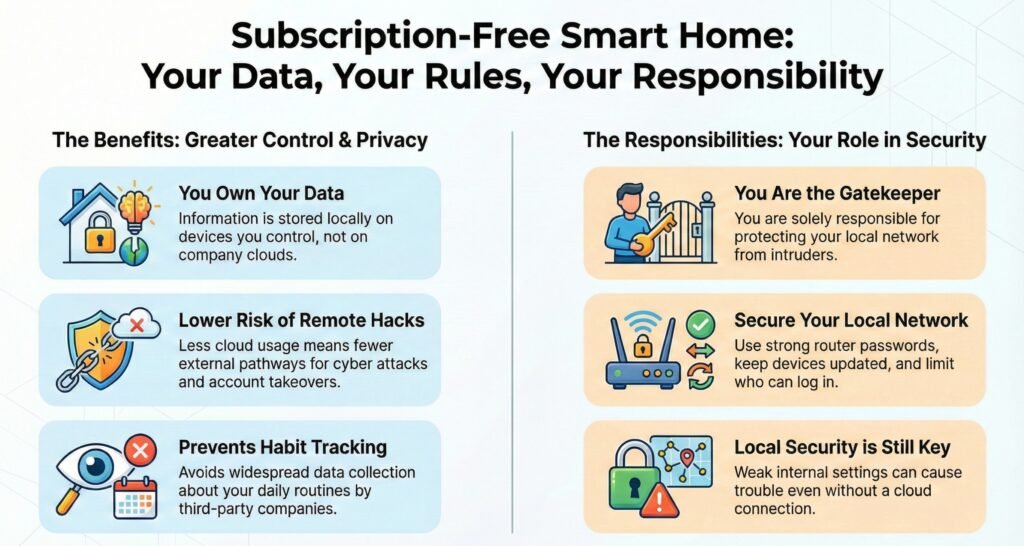
Going subscription-free changes where your data lives, and subscription free smart home privacy and security usually improves when less information leaves your home.
Data Storage and Ownership
Subscription-free systems often save data on local devices—like hubs, memory cards, or a home server. This means you keep direct control of your data, instead of sending it off to some company’s cloud.
Local storage lowers the risk of third-party data sharing, which is a real problem in connected homes, according to research on smart home privacy and security risks.
But you’re still responsible for protecting it.
If someone gets into your local network, they could reach stored logs, video, or device settings. So, strong router passwords, device updates, and limiting who can log in are important. Without a vendor handling security for you, weak settings can still cause trouble—even without cloud access.
How to Reduce Cloud Access Without Breaking Your Setup
Automation without subscriptions usually means less or no constant cloud connection. Devices talk to each other inside your home instead of sending data out.
Less cloud use means fewer chances for remote hacks or account takeovers—stuff that often hits cloud-linked devices, as shown in reports on smart home cyber attack and privacy threats.
You also avoid a lot of data collection about your habits.
Some features still need the internet (usually voice commands and remote access), but your local routines can stay independent—especially when you use a local smart home hub for automation as the rule engine. If you don’t need them, just turn them off. Fewer outside connections mean fewer attack paths, but local security is still key. Network isolation, keeping devices updated, and checking for weird activity all help protect systems that mostly run inside your house.
How to Integrate Smart Devices Without Ongoing Fees
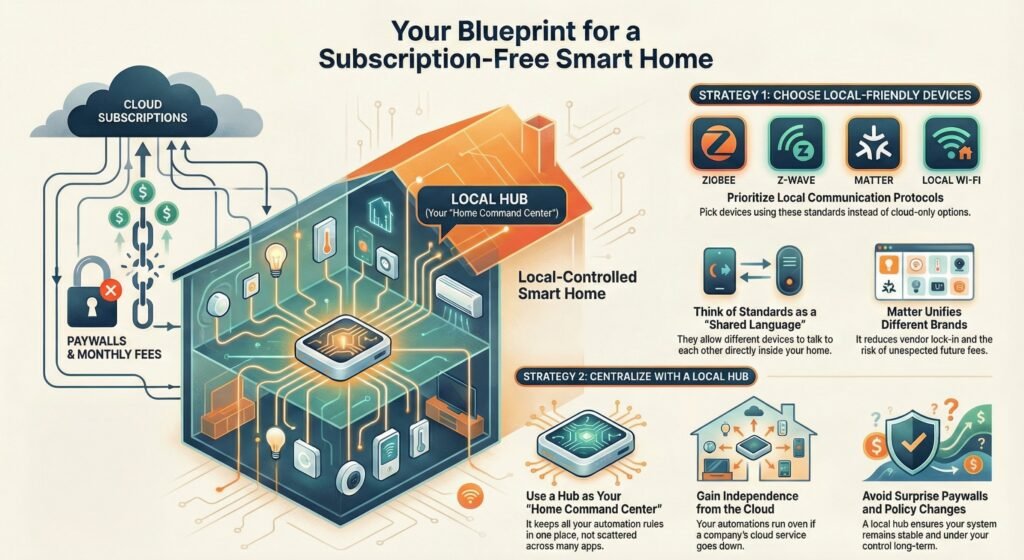
You can integrate smart devices without ongoing fees by choosing local-friendly standards and keeping automation rules in one place.
Compatibility and Standards
You avoid subscriptions by picking devices that use local protocols instead of cloud-only options. Popular choices are Zigbee, Z-Wave, Matter, and local Wi‑Fi control. These let devices talk inside your home, not through paid servers.
Matter is a big deal because it sets shared rules across brands. That means less lock-in and less risk of future fees. Zigbee and Z-Wave are great for lights, sensors, and switches—just pair them with a local hub.
Think of standards as a “shared language” for your devices. When your lights, sensors, and switches speak the same protocol, they can work together locally—so you can build automation without being forced into monthly accounts or cloud lock-in.
Before you buy a device, check that it supports local control and won’t need an account after setup. This guide on making smart home devices work together covers how protocol choices affect your costs down the road.
One Control Layer: Using a Local Smart Home Hub for Automation
You’ll have the easiest time with a local smart home hub for automation (or a local server) that keeps your rules and integrations in one place.
Central control stops you from juggling a dozen apps and avoids surprise paywalls. Your automations keep running, even if a company changes its terms or shuts down cloud access. That keeps your system stable for the long haul.
Multi-brand setups work best if you plan ahead. Map out which devices should trigger what. Keep your rules in one place, not scattered across lots of vendor apps.
A local hub works like a “home command center.” Instead of juggling multiple apps, your devices connect to one control layer where your automations live—so your routines keep running even if a vendor changes policies or a cloud service has an outage.
Some planning and a central control point match what’s recommended in this guide to integrating smart devices seamlessly—and you won’t get hit with surprise fees.
Limitations and Trade-Offs of Subscription-Free Automation
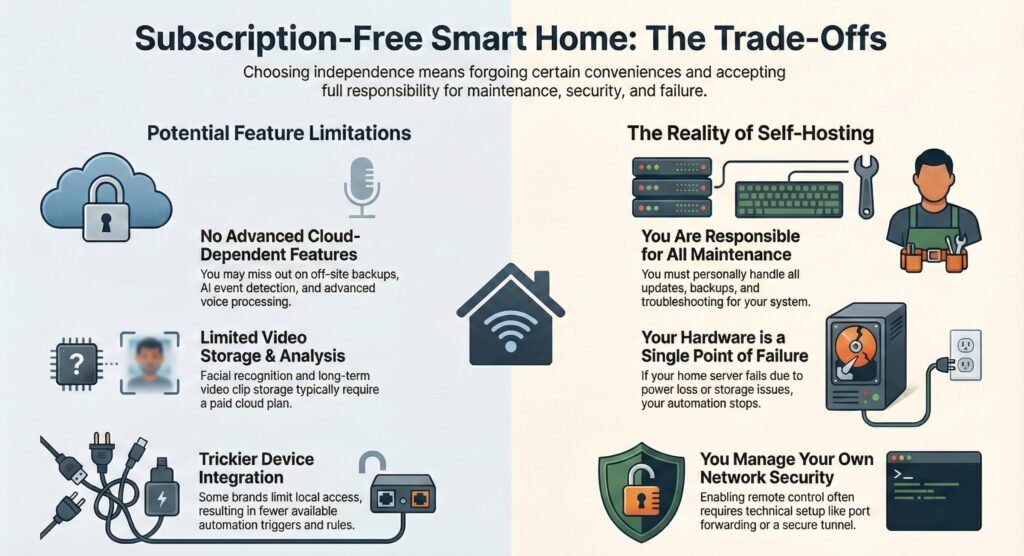
Going subscription-free gives you more control and cuts down on monthly bills, but there are some real trade-offs. You might lose a bit of convenience, a few polished features, and some vendor support in exchange for flexibility and independence. Is it worth it? That depends on what you want out of your smart home.
Advanced Features You May Not Get
A lot of subscription-free systems are built to avoid cloud services altogether. Because of that, you might miss out on features that really depend on always-on internet or remote servers.
Some of the usual gaps? You probably won’t get off-site backups, advanced voice processing, or AI-based event detection for your cameras or sensors. Take video systems, for instance—if you want facial recognition or to keep long-term video clips, you’ll usually need a paid cloud plan. Local setups can still record video, but it’s almost always saved just to your own gear.
Getting devices to work together can also be trickier. Certain brands keep local access limited, which means you can’t automate as much unless you pay. You might have to settle for fewer triggers or just basic automation rules.
These limits don’t stop you from automating things, but they do change what’s realistic and how much effort you’ll put in to get set up.
Self Hosted Smart Home Automation System: Maintenance Reality Check
Going subscription-free often means running a self hosted smart home automation system that stores your rules, backups, and device integrations on hardware you control. That’s something you’ll set up on a home computer, server, or maybe a Raspberry Pi or similar device.
This route puts maintenance on your plate. You’re in charge of updates, backups, and sorting out problems. If your hardware goes down, so does your automation—at least until you fix it. Power outages or running out of storage are bigger deals when there’s no cloud backup to fall back on.
You’ll probably also need to handle local network access and security. If you want remote control, it might take some extra steps—maybe port forwarding or setting up a secure tunnel. Some folks use optional services to make this easier, but you don’t have to.
Self-hosting really pays off if you’re willing to learn and tinker. It’s just part of the deal—you get more control, but you take on more responsibility too.
Setting Realistic Expectations for Subscription-Free Automation
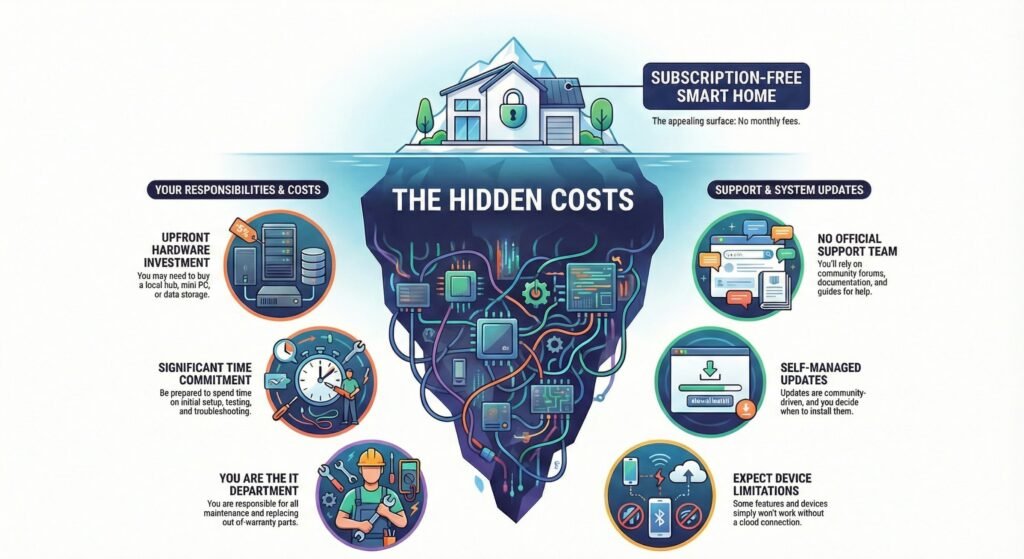
Running a smart home without subscriptions means you’re in charge, which is great, but it also means you pick up some of the slack. You skip the monthly bills, sure, but you might spend a little more time, energy, or pay for some one-time things to keep everything humming.
Possible Hidden Costs and Considerations
There’s no monthly fee, but don’t be surprised if other expenses pop up. Usually, it’s hardware, setup, or just basic upkeep—not software access—that costs you.
Here’s what to keep in mind:
- Local hardware like a hub, a mini PC, or something to store data
- Power use—it’s not much, but it runs 24/7
- Time investment for getting things set up, testing, and fixing issues
- Replacement parts if something breaks after the warranty runs out
Many systems rely on local processing instead of cloud stuff. That’s good for privacy, but again, you’re the one doing the maintenance. If you want a closer look at how this plays out, check out this deep dive on home automation without subscription—it’s pretty eye-opening.
You’ll also need to accept some limits. Not every device works offline, and some features just won’t be available without the cloud.
Support and Updates Without a Subscription
No subscription usually means no official support team. You’ll be leaning on the community—forums, docs, and guides.
Here’s what you can expect:
- Self-guided troubleshooting—mostly digging through posts and manuals
- Community-driven updates that come out on a regular schedule (more or less)
- No guaranteed response time if you need help
Lots of these systems are open source. So, updates keep coming as long as the project is alive. If it’s popular, you’ll see new fixes and features pretty often. You decide when to install them, which can be nice—or a bit of a chore, depending on your mood.
Some articles, like AI is not magic in automation projects, do a good job of showing why it’s important to know your limits. That really fits here. Subscription-free automation works best if you’re ready to learn and get hands-on.
Protect Your Smart Home Network Without Cloud Dependence
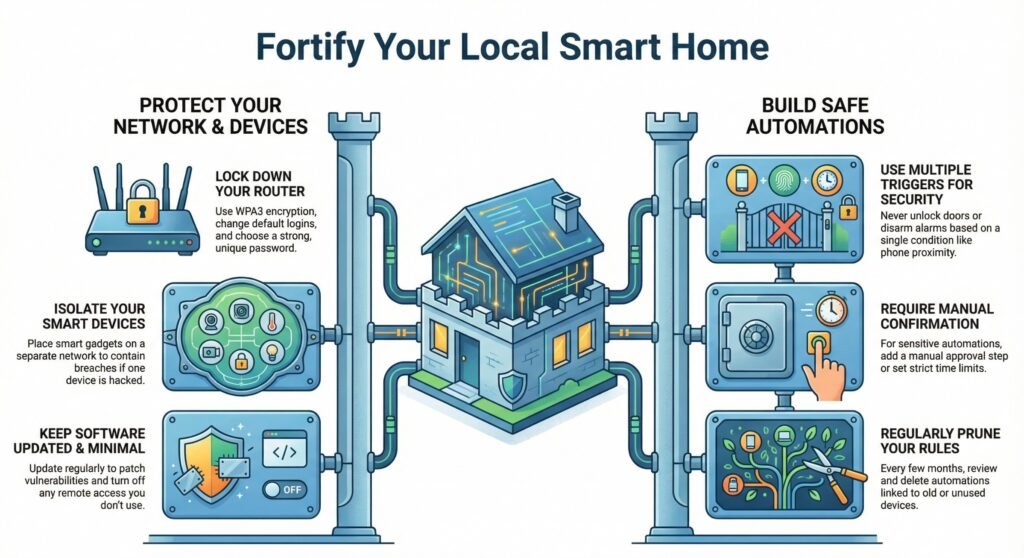
Skipping subscriptions also means your data doesn’t get sent out to someone else’s servers. That’s a big plus for privacy, but it also means you need to take security into your own hands.
Protecting Your Network and Devices
Your home network is really the nerve center for all your subscription-free automation. If someone gets in, they could mess with everything you’ve connected.
First, lock down your router—this is the fastest way to protect smart home network without cloud dependence becoming a weak point. Use WPA2 or WPA3 encryption, change those default logins, and pick a strong, unique password. If your router lets you, put smart devices on their own network—that way, if one gets hacked, the rest are safer.
Going local reduces cloud exposure, but you still need updates and strong router settings to protect smart home network without cloud reliance. A lot of security problems come from old software. Research on smart home privacy and security risks shows that outdated devices are a common way in for attackers.
Also, take a look at your device settings. Turn off remote access, cloud sync, or voice controls you don’t actually use. It’s a simple step, but it helps.
Best Practices for Safe Automation
It’s surprisingly easy to create security holes if you don’t think through your automation rules. For instance, imagine unlocking your doors or turning off alarms just because someone’s phone shows up nearby—yeah, not great.
Here are a few things I’d suggest:
- Don’t rely on just one trigger for important stuff like door locks or alarms
- Set time limits or ask for manual confirmation with sensitive automations
- Whenever you can, keep your automation logic local instead of depending on the cloud
Every few months, take a look at your automation rules. If you spot any that are linked to old or unused devices, just delete them. Honestly, fewer rules usually mean fewer headaches when something goes wrong.
Most break-ins happen because of weak passwords and outdated firmware—not because someone is running an advanced hack.
Local Smart Home Automation FAQ: Offline, Privacy, and Setup
1) What does smart home automation without subscription actually mean?
It means your core routines (schedules, sensor triggers, scenes) run locally, so you’re not paying monthly fees just to keep basic automation working.
2) What smart home automation works without internet?
Local routines like motion-triggered lights, schedules, and device-to-device triggers can keep running offline—especially when the automation rules stay on your home network.
3) Do I need a local smart home hub for automation to avoid subscriptions?
Not always. Some devices run schedules on-device. But a local hub helps when you want one place to manage rules and integrate devices without ongoing fees.
4) How to automate smart home without subscriptions as a beginner?
Start with one room, choose devices that support local control, keep routines simple (time + motion + door triggers), then expand once everything is stable.
5) Is subscription free smart home privacy and security actually better?
Often, yes—less data leaves your home. But you still need to protect your network with strong router settings, updates, and limited remote access.
6) What are the biggest trade offs of a self hosted smart home automation system?
You gain control and stability, but you take on maintenance—updates, backups, and fixing issues if the local hardware goes down.
You may also read
- Smart Home Devices Work Offline: What Works Without Internet and What Stops
- Essential Smart Home Sensors: Boost Safety and Convenience with Motion, Water Leak, and Automation Solutions
- SmartThings vs Hubitat: Zigbee, Matter & Automation Compared
- Smart Home Overkill: Avoiding Automation Burnout
- Smart Home Geofencing: Location-Based Tricks & Automation Ideas
- Smart Garden & Outdoor Tech: Best Automation Systems for Yards & Balconies